ADVERTISEMENT
🔍 Free Google SERP Simulator

Google SERP Preview Tool
(Free Meta Title & Description Checker)

See exactly how your page appears in Google search results. Optimize your meta title, description, and URL for maximum click-through rate — free, real-time, no login required.

Preview My SERP Now →
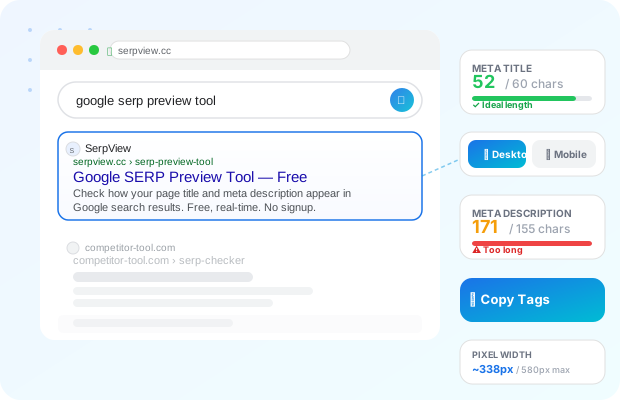
Google SERP Preview Tool illustration showing a browser with a search result card and live meta tag analysis

📝 Enter Your Meta Data

0 / 60 characters
~0px estimated width
0 / 155 characters
~0px estimated width

🔍 Live SERP Preview

Google Search — Desktop
serpview.cc serpview.cc › serp-preview-tool

Check How Your Page Looks on Google

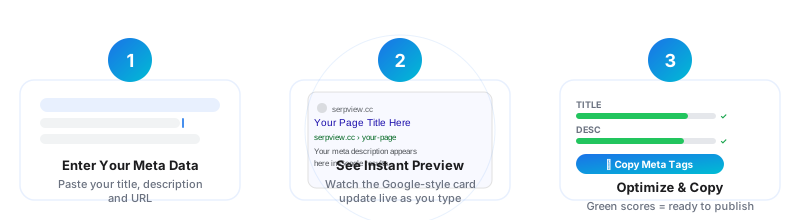
Three steps from raw metadata to a perfectly optimized Google snippet.

1

Enter Your Meta Data

Paste your page title, description, and URL into the fields above. The preview updates instantly.

2

See Instant Preview

Watch the Google-style SERP card update in real-time as you type, with live length indicators.

3

Optimize & Copy

Adjust your content until all indicators show green, then copy your formatted meta tags in one click.

How SerpView works — 3 step visual: enter meta data, see instant SERP preview, optimize and copy

Optimize Your Meta Title and Description

All the tools SEO professionals use to craft perfect Google snippets — free.

📏

Character Counter

Live count for title (60 chars) and description (155 chars) with color-coded feedback at every range.

📐

Pixel Width Check

Estimate the pixel width of your title and description exactly as Google renders them.

🖥

Desktop + Mobile

Toggle between desktop and mobile preview to see how your result looks on every device type.

✂️

Overflow Detection

Instantly see which part of your title or description Google will truncate — highlighted live.

📋

One-Click Copy

Copy properly formatted meta HTML tags to your clipboard — ready to paste into any CMS.

Real-Time Updates

No reload, no button — the SERP preview updates instantly on every keystroke as you type.

Improve Your SEO Click-Through Rate

Your meta title and description are the first things users see in Google search results. A well-optimized title drives more clicks, and a compelling description sets expectations before anyone visits your page. Our free Google SERP Preview Tool shows you precisely how your metadata will appear — helping you avoid truncation, improve relevance, and boost your organic click-through rate without any guesswork. Used by SEO professionals, content marketers, and web developers worldwide.

📌 Meta Title Best Practices

  • Keep titles between 50–60 characters
  • Place your primary keyword near the beginning
  • Include your brand name at the end (after a dash or pipe)
  • Make it compelling — it's your organic ad headline
  • Avoid keyword stuffing; write for humans first

📌 Meta Description Best Practices

  • Aim for 140–155 characters for full visibility
  • Include a clear call-to-action (Learn more, Shop now, etc.)
  • Naturally use your target keyword once
  • Match the intent of the page content accurately
  • Each page should have a unique description

Desktop vs Mobile: What Google Actually Shows
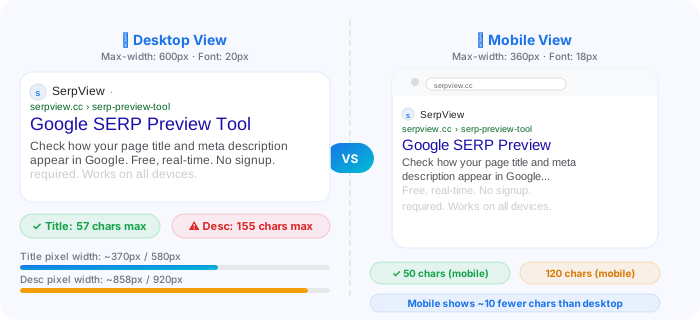
Comparison of Google SERP result on desktop (600px wide, 20px title) versus mobile (360px wide, 18px title)
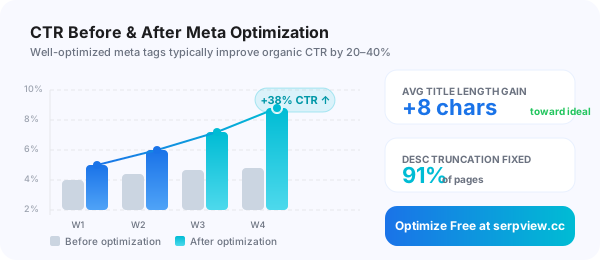
Bar chart showing CTR improvement before and after meta tag optimization — average +38% increase over 4 weeks
ADVERTISEMENT

Get a Free SEO Audit for Your Website

Let our team analyze your meta tags, page titles, and on-page SEO — and send you a detailed report within 24 hours. No credit card required.

Frequently Asked Questions

A SERP preview tool lets you see how your webpage's title tag and meta description will appear in Google's search results before you publish or update them. It simulates the actual Google search result card — including truncation — so you can optimize your meta tags to maximize click-through rate without guessing.
Google typically displays between 50–60 characters for desktop and slightly fewer for mobile. In pixel terms, Google caps titles at approximately 580px on desktop. We recommend keeping titles between 55–60 characters to ensure full visibility. If your title is cut off, users see only partial information — which can hurt CTR significantly.
The sweet spot for meta descriptions is 140–155 characters. Google has been known to extend this to ~160 characters in some cases, but for consistent cross-device display, targeting 150 characters is a safe standard. Descriptions that are too short may be replaced by Google with random page content, which is rarely optimized for conversions.
Click-through rate (CTR) is a direct quality signal to Google. When more users click your result compared to competitors for the same query, Google interprets this as a sign of relevance and may boost your ranking. Improving your meta title and description is one of the highest-ROI SEO activities because it affects all your existing rankings immediately — without needing new backlinks or content.
Not always. Google may rewrite your meta title or description if it determines that its own generated snippet better matches the user's search query. This happens more often when your meta description is missing, too short, or mismatches the page content. The best defense is writing clear, keyword-relevant, human-first meta tags — which our tool helps you do.

Start Optimizing Your Google Snippets — Free

No signup. No install. Just paste your meta tags and see exactly what Google sees.

Preview My SERP Now →
ADVERTISEMENT
Copied!